
You can hide any single link and the / after it using Custom CSS, which goes in the Custom Styling area in Theme Options.
The trick is knowing which list item the link is. This can be determined from counting the number of objects from left to right:
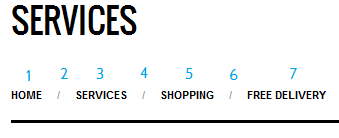
In the above example, the services category is 5 and the slash that comes after it is 6. You can now use the nth-child selector to hide just these two elements like this:
.single-services #crumbs li:nth-child(5),#crumbs li:nth-child(6) {

display: none;

}