Knowledgebase

Portfolio or other special page links not highlighted as active or stuck on active

Intro

To work around this, you may give the menu item a custom class in Appearance → Menus. Click Screen Options in the upper-right of the Menus page and ensure CSS Classes box is checked. Expand the menu item that is misbehaving and enter a custom class name in the CSS Classes field. In the Custom CSS, […]
Solution

To work around this, you may give the menu item a custom class in Appearance → Menus.

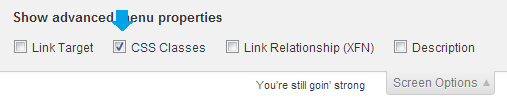
  1. Click Screen Options in the upper-right of the Menus page and ensure CSS Classes box is checked.
    enable css class in menu
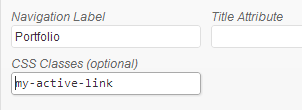
  2. Expand the menu item that is misbehaving and enter a custom class name in the CSS Classes field.
    custom menu class
  3. In the Custom CSS, add your style like this:
    .my-active-link  a .class:active { color: #f00; background: #000000; font-weight: bold; }
  4. Replace the properties/values with your desired styles.


Get 15% off!

Signup and get 15% off any of our Ghost or Framer themes immediately