
This is usually due to the widget settings not being completely configured.
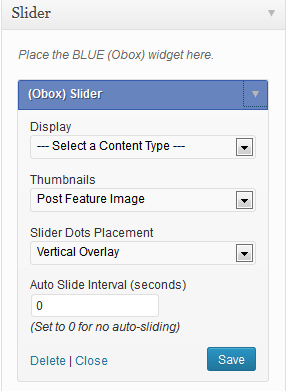
- Go to → and expand the Slider widget on the right
- Select a post type in the Display menu and click Save to load the next filter
- Select the filter type and click Save.
- Select the tag or category etc and click Save.
- Confirm the remaining settings and click Save again.
If you are only displaying one post, or are displaying Videos instead of thumbnails, ensure Auto Slide Interval is set to 0
For detailed instructions on configuring your widgets, see Gigawatt: Setup Your Widgets
Other Causes
The slider may also collapse if you are choosing to display a category containing a post with no image or video, or you have your Thumbnail option set to display Videos but a post in the loop is missing a featured video. Ensure all posts have appropriate content for the settings you choose.