Visitors will need to ensure facebook.com is an exception in any popup blocking setting in the browser, or that popup blocking is turned off. You may need to refer your customers to the following links if they contact you with questions, or repeat the detailed steps provided below
Changing Settings in Internet Explorer
Recommended IE10 Internet Settings
- Your customers should be signed in to Facebook before making a purchase.
- If the “only secure content is displayed” banner appears, it can be ignored. If you click Show All Content, it will not cause a problem, but it will reload the app and will add a large amount of unnecessary space at the bottom of the page.

- Click on the Gear icon in the upper-right of the IE10 window and choose Internet Options
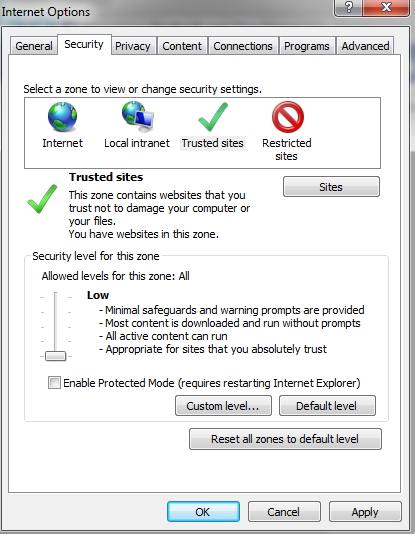
- Click on the Security tab and click Trusted Sites
- Click the Sites button. https://www.facebook.com should be listed in the site field already. Click Add then click Close
- Drag the security slider to Low and uncheck Enable Protected Mode (this is not required if the site is Trusted)
- Click Apply then click OK
- Reload the app and the cart should work without issue.
Probelems with 3rdParty Checkout
If there are additional issues with 3rd Party Checkout extensions such as 2Checkout, Paypal Advanced, etc and the checkout not opening a new window, ensure the following settings are also in place:
- In Internet Options, click the Privacy tab
- Click Advanced.
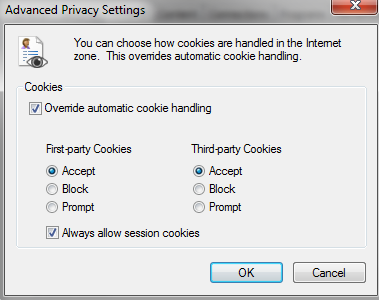
- Check Override automatic cookie handling and check Accept, then Always allow session cookies and click OK

- Back on the Advanced tab, uncheck Turn on Popup Blocker. If it is important or required to have this enabled in IE for your location, leave it enabled and click on Settings, then add https://www.facebook.com to the allowed sites.
- Click Apply and OK
- See also Social Commerce: Nothing happens on checkout with Paypal or 3rd Party Vendor